Overview
Policy-controlled continuous authentication lets administrators enable continuous authentication for specific users instead of applying it to all users in a tenant. This capability addresses the limitation of Beyond Identity’s original continuous authentication model, which could only be enabled or disabled globally.
With this feature enabled, administrators use policy rules to determine which endpoints perform continuous authentication. When an endpoint authenticates, Beyond Identity evaluates applicable policies. If a policy rule applies the Enable Continuous Authentication action, the endpoint performs continuous authentication at a predefined interval. If no such policy rule is matched, continuous authentication is not performed.
Policy-controlled continuous authentication must be enabled for your tenant by Beyond Identity. If your tenant was not previously using continuous authentication, enabling this feature does not change end-user behavior. If continuous authentication was already in use, all continuous authentication is temporarily stopped until policy rules are configured, as described in the following section.
Enable continuous authentication for end users
When the policy-controlled continuous authentication feature is enabled, continuous authentication is enabled for an end user with a Beyond Identity authentication process, provided that:
- The policy returned an Allow decision for this authentication request, and
- A policy rule that enables continuous authentication was hit during the authentication process.
Steps
To create a policy rule that enables continuous authentication in the Admin Console:
- Log in to your Secure Work tenant.
- Navigate to the Policy page.
- Click Edit Policy.
- Click Add Rule.
- Complete the Information and Conditions sections as needed. For example, to enable continuous authentication for all users in a group named myTestGroup, configure the rule conditions as shown in the image below.
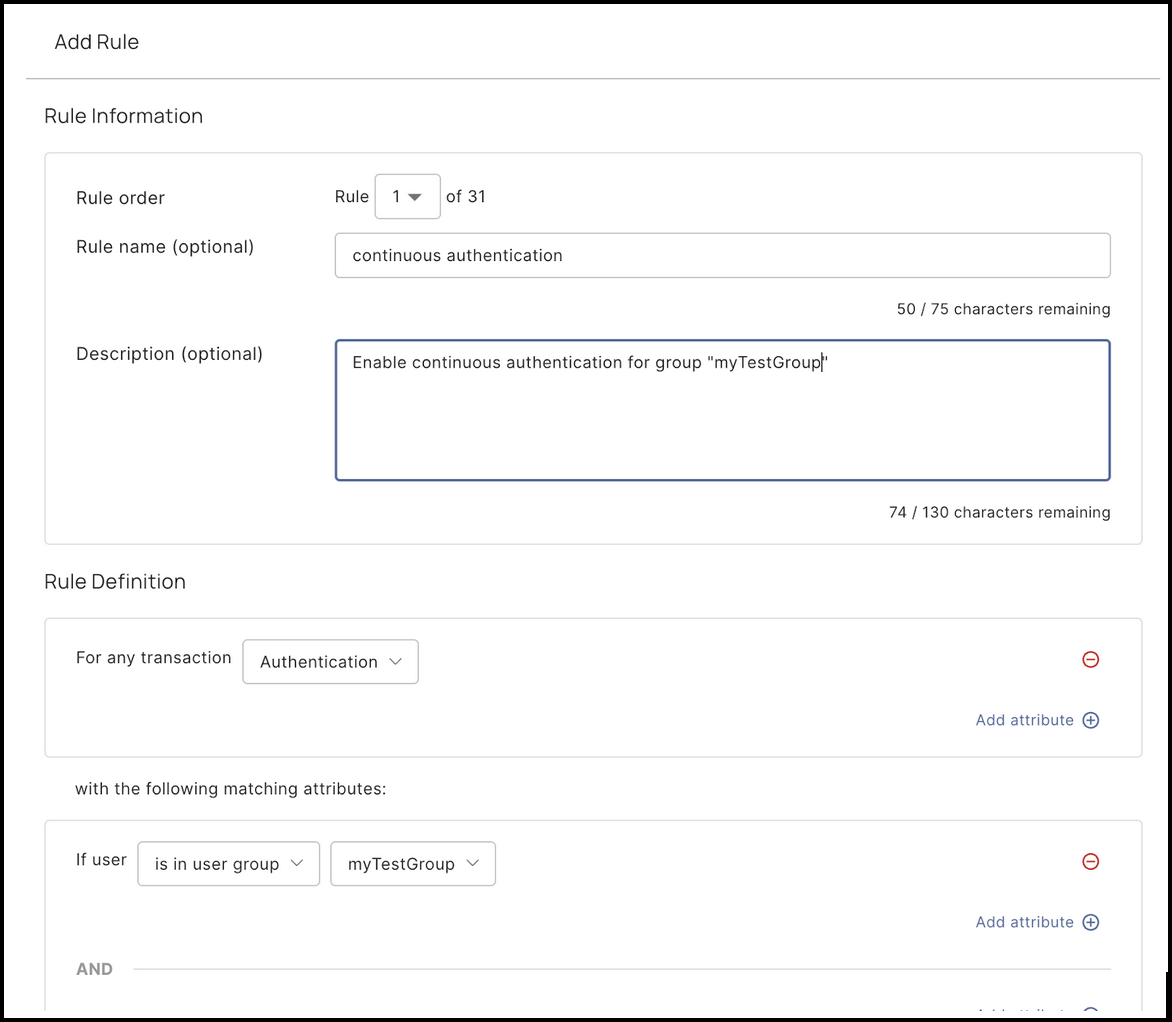
- Set the action of the rule to Monitor, and check the box Turn on continuous authentication.

- Order this rule appropriately.
A rule with a Monitor action does not terminate policy evaluation during authentication. If the policy evaluation terminates (for example, by reaching an Allow decision) before a Monitor rule with the Turn on continuous authentication action is evaluated, continuous authentication will not be enabled for the end user.
For this reason, we recommend placing the rule that enables continuous authentication at order 1, or near the top of the policy, to ensure it is evaluated before the policy terminates during authentication.
If you want this slightly more concise or more formal to match other sections, I can adjust the tone in seconds.
Disable continuous authentication for end users
If an end user with continuous authentication enabled needs to have continuous authentication disabled, ensure that the user no longer hits a rule that enables continuous authentication. For example, if the rule is conditioned on membership of the myTestGroup group, removing the user from this group will achieve the desired behavior. Continuous authentication will be disabled for this particular user the next time they perform a continuous authentication with Beyond Identity.