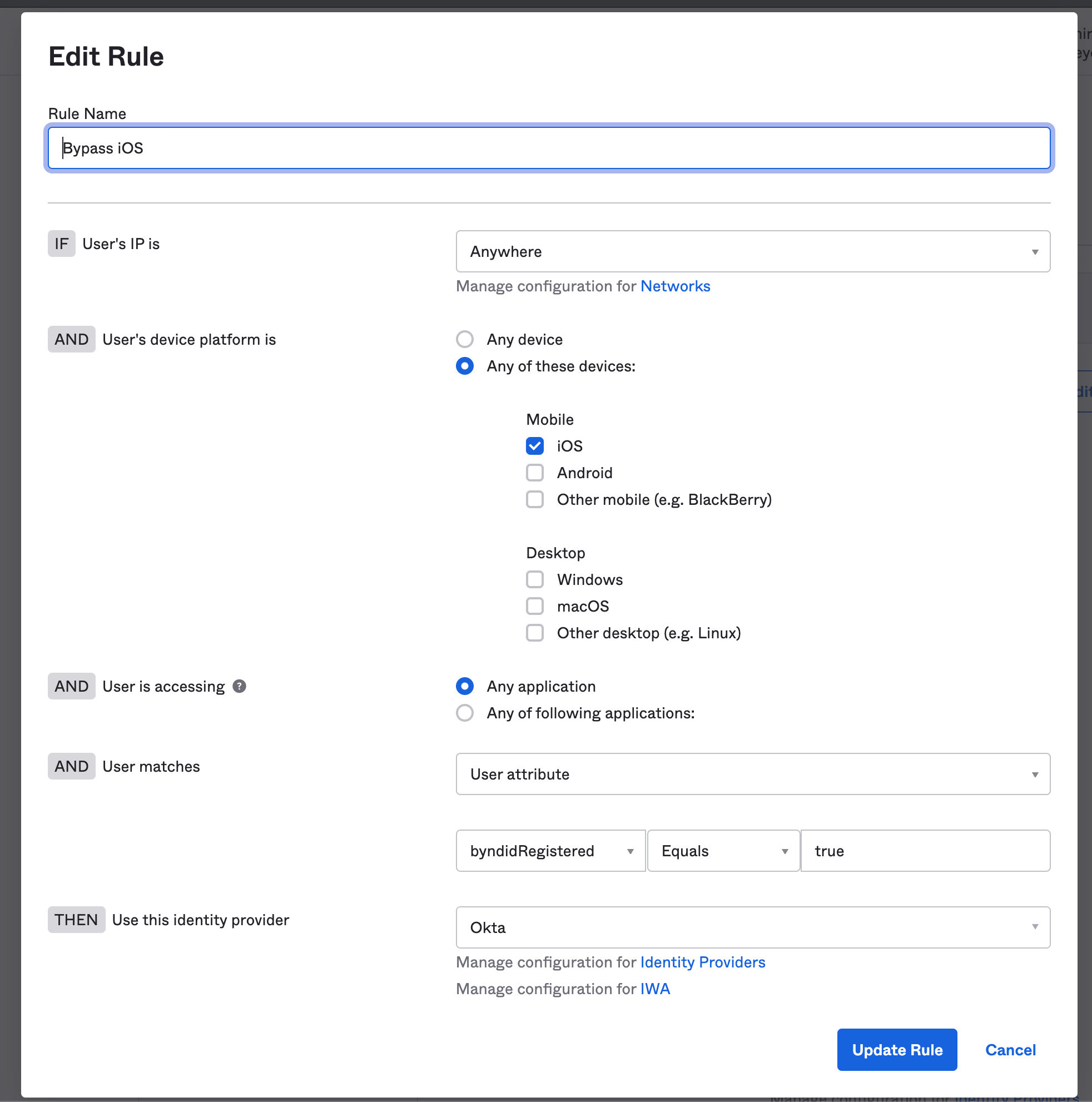
This article explains how to create an Okta routing rule that bypasses Beyond Identity for certain devices or conditions (example: all iOS devices) and instead uses Okta as the identity provider.
In certain cases, an Okta administrator may need to bypass Beyond Identity for authentication on a specific platform or for a particular application. The instructions below describe how to configure this behavior by creating a new routing rule.
Steps
Navigate to Security → Identity Providers → Routing Rules.
Select Add Routing Rule.
Configure the rule as follows (example: bypass Beyond Identity for all iOS devices):
Rule name: Provide a descriptive name.
If User’s IP is: Anywhere
And User’s device platform is:
Select Any of these devices, then choose iOS
And User is accessing: Any application
And User matches (User attribute):
byndidRegisteredequalstrue
Then use this identity provider: Okta
Note: The example above shows how to bypass Beyond Identity for all iOS devices. You can create similar routing rules for any mobile or desktop platform. You can also configure rules to bypass Beyond Identity for specific applications when needed.